Quantcast

ClickEquations – Complex Paid Search Campaign Management, Simplified


Last week Alex Cohen, Marketing Manager at ClickEquations sat down with us to give us his first hand insight on the benefits of their paid search product and why marketers should give it a test drive for themselves.

[Manoj]: Give us a brief description of what ClickEquations does and some of its greatest benefits

[Alex Cohen]: ClickEquations is the tool we dreamed of having years ago when we managed paid search accounts directly using other tools or working directly in the engine interfaces. It’s a complete paid search management platform, proving detailed reporting, powerful analysis capabilities, full campaign editing, and bid management. This means that a paid search manager can build, manage, and report on all of their campaigns, in all search engines, from a single interface while both saving time and delivering better results.

We were a paid search agency managing large and complex campaigns in retail, lead gen, and media. So we know the frustration of not being able to get the data you need, of slow reporting interfaces, and of the frustrating multi-step (and often multi-tool) repetitive processes that fill the days of many PPC professionals. Our old pet peeves are directly responsible for the best features in ClickEquations. This is true within our of data, reporting, and editing features.


For example, we aren’t big fans of ROAS as a success metric, so in ClickEquations you can define the actual profit margin for every conversion event and then see net profit and actual ROI results at the keyword, ad group, or campaign levels. This allows much better keyword and bidding decision making. And we knew that search queries are the only way to know which keywords need to be added, which negatives are required, and how to best use Match Types, so we collect and display nearly every search query that drives visitors to your site and let you see the keyword and match type that they were matched too – and we do this for all three search engines. This allows our customers to save money and grow campaigns very quickly.

We went to great lengths to make our reporting interface highly customizable and extremely fast – paid search managers need to slice and dice their data all day long. Looking at different metrics for a single ad group, or rolling up data across campaigns, comparing one date range to another, etc – it’s too painful to have to sit and wait for screens to redraw at each step. Our performance not only saves time, I think it actually encourages or allows managers to do the type of analysis and gain the insights they really need. When the interface is too slow my experience is that after a while you just stop navigating reports, you get worn down by the process.

Even with rich data and a fast, flexible reporting interface, we know paid search managers face a mountain of data every day. It’s nearly impossible to really examine hundreds or thousands of ad groups and tens of thousands of keywords for problems or potential changes. So we have tools and analysis reports that call out these risks and opportunities. A simple one shows all the keywords that are currently below Google’s First Page Bid Estimate. It’s easy for these to go un-noticed for days or weeks without such a report. Another shows you which campaigns are leaving money on the table due to low Impression Share metrics. A more complex example lets you see where keywords are producing great results in one search engine but not in another – offering a quick win by simply copying the winner from engine ‘A’ to engine ‘B’.

[Manoj]: ClickEquations is known for its slick interface, so what makes your interface so good

[Alex Cohen]: I think the core of it comes from the fact that we managed search campaigns ourselves. The most frequent comment we get from people who see us at trade shows or on our weekly webinars is “it’s so clear you guys really understand ppc”. There are all kinds of large and small aspects of our interface and product that come from our deep practical experience in the space.

The other thing about our interface is that we realize the importance of context. Most tools seem to developed with the goal of replicating the AdWords or AdWords Editor interface, supporting three engines, and then adding a few bells and whistles. We think this is a fundamentally flawed approach. The engine interfaces are utilitarian at best, and designed by the seller. They’re trying to make it easy for you to spend money, not necessarily to understand how you’re spending it or spend it wisely. They also over-compartmentalize components – add keywords here, set bids there, edit text ads there – when these element interact and smart changes need to consider these interactions.

[Manoj]: How does attribution fit into your solution?

[Alex Cohen]: This is a great example of where a lack of the right data and clear access to it can really make it hard to make smart paid search decisions. We all know that some users visit sites multiple times before making a purchase. Yet the conversion tracking features from the search engines and most analytics and even paid search tools, give 100% revenue credit to the last keyword.

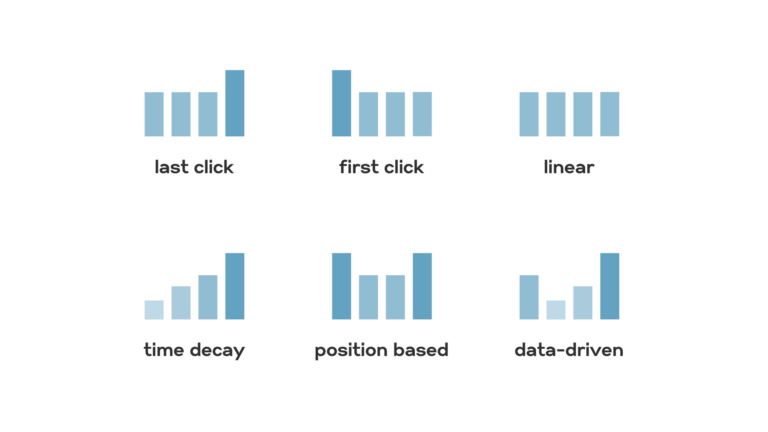
ClickEquations supports four attribution models – first click, last click, linear, and weighted (which overweights keywords which occur more frequently in successful chains) –so our users can both choose how they want to distribute revenue among keywords and more importantly see and make choices based on the differences. We’re the only vendor, to my knowledge, to allow you to change the attribution model retroactively – you can switch from one to another on-the-fly and then go back and look at historical reports to see the impact.

We also let you apply different attribution models to each bid rule, so you can use a last-click model for your brand terms for example, and a linear model for your category keywords. And finally, we have reports in ClickEquations Analyst (our excel plug-in) that let you see individual keywords and the impact of each attribution model on them for any time period, with helpful conditional formatting to highlight big shifts. All of this drives a better understanding of keyword performance, which can drive better decisions about which keywords to pause or delete and how to set keyword bids. Without visibility into this data, a lot of those decisions are just guesses.

[Manoj]: Tell us a little bit about some of your product specific metrics such as ClickShare and ClickVariance

[Alex Cohen]: Part of our quest for clear detailed data produced the not-so-surprising realization that the search engines aren’t telling us everything we’d like to know. A lot of what they keep private is data that only they have, but some of it is buried in all the data they do provide.

We have developed a series of proprietary metrics that offer additional information and insights to our clients. ClickShare and ClickVariance are two of them. ClickShare is our extension of Impression Share, taking the concept of ‘wh
at you’re missing’ from the Campaign to the Ad Group and Keyword levels. It looks at your CTR, average position, and the CTR of the text-ads being used, and calculates the potential for improvement in clicks. So if an Ad Group had 10,000 impressions and 500 clicks, ClickShare would give you an idea of how many more clicks were possible, and the relative role position and ad-copy play in causing the missed clicks. What this helps you do is prioritize effort – it can call out the ad groups where text-ads are under-performing and you should consider spending time writing new copy to test. Without this metric, if you just looked over the Ad Group report, it would be impossible to tell that in these specific Ad Groups testing could have a 50% impact on click volume, while in those Ad Groups at most it would be likely to only have a 2% impact.

ClickVariance provides a similar service in terms of highlighting Ad Groups where there are too many keywords – not against some arbitrary number that is good or bad – but based on how the keywords in that Ad Group are performing. What we recommend is looking at groups with high ClickVariance numbers, and seeing if there are natural segmentations for the keywords they contain. Usually when you review an Ad Group with a moderate to high ClickVariance, it’s pretty obvious where and how you could split the keywords into two or three groups. This makes it possible to better match the keywords, search queries, ad copy, and landing pages – which leads to higher Quality Scores, lower costs, more profit.

[Manoj]: What is the cost of ClickEquations?

[Alex Cohen]: The ClickEquations fee is based on how much you spend on paid search. It’s typically in the 2%-3% range with a minimum fee of $1,000 per month. Check out our pricing page for full details. Agencies get a discount, because all of their clients’ spend counts toward their total. We have no setup costs and support is free.

This Weeks Must Reads in Internet Marketing

August is quickly coming to and end, meaning an end to summer? Quite possibly, but to cheer you up a little below are some great reads from around the industry.


Bottlenecks to Implementing Analytics

Unrehearsed discussions about web analytics, marketing, web design and testing with experts in the field. In this episode, part 1 of a 3 part series called “Bottlenecks to Implementing Analytics“, web analytics experts and Googlers Avinash Kaushik and Nick Mihailovski talk with Jeff Gillis from the Google Analytics team about the difficulties Enterprise level companies face in adding web analytics to their corporate culture.

Personas: How the Internet Sees You

Interested in knowing how the rest of the Internet sees you? Check out Personas created by MIT’s Aaron Zinma. Personas uses sophisticated natural language processing and the Internet to create a data portrait of one’s aggregated online identity.

It is meant for the viewer to reflect on our current and future world, where digital histories are as important if not more important than oral histories, and computational methods of condensing our digital traces are opaque and socially ignorant.

Check out the samples I ran for my name and my wife’s name. On the most part Personas was quite accurate and the data was very interesting, however some categories it included for me were “Medicine” and “Legal: which weren’t really relevant. For my wife, “Sport” was huge – which is not relevant at all. Click images for larger view.

Twitter Management using Buzzom Desktop

What desktop tool do you use to manage your twitter account? You have probably seen or are currently using TweetDeck or Seismic Desktop. They are amazing tools, and are great for multiple account management and multi-column layout.

In the past couple of days I have been testing a new Desktop App, Buzzom Desktop developed by InRev Systems. This Desktop Tool has some really useful features, such as:

  1. Hide users who are spamming with too many or useless tweets without unfollowing them.
  2. Get updates on what the twitter elites like GuyKawasaki, BBC etc. are saying without following them.
  3. Configure your buddy list and be in touch with them by viewing only their tweets.
  4. Find news and people using keyword Search for tweets, location and biography.
  5. Auto shorten your long URLs when they’re sent using http://nxy.in/.
  6. Drag-drop video and pictures to auto upload and tweet about them.
  7. Choose how you want to see your tweets, by auto refresh or manual refresh.

Buzzom Desktop is still in Alpha, but is available for download here: http://www.buzzom.com/BuzzomLab

When to use paid and free analytics services

Guest Author: Justin Kistner, Webtrends

Recently there have been several stories trying to understand when to use paid solutions over free solutions like Google Analytics. One post was talking about Google’s Achilles Heel referring to the fact that they don’t identify individual visitors. Another was a question asking “When is Google not enough?” From our most recent launch we saw two stories comparing us to Google: Google Eat your Heart Out and Webtrends steals Google’s lunch money and spits in its face.

We wanted to take a moment to offer some insights into the decision on whether to use a free or paid service. The truth is, it’s not us vs. Google. We like Google! Their free service has spread the power of analytics to a much broader audience, which has helped businesses understand more about what analytics is and how it can help them. While we’re both in the analytics market, we don’t necessarily serve the same customers. To help clarify, let’s take a closer look at some of the factors that determines whether or not to use a paid analytics service.

Tracking visitors

All analytics tracks visitors in aggregate, but it’s tracking them in detail that is the deciding factor. If you’re wanting to connect an individual’s site behavior with your CRM profile, you’ll need to look at paid solutions. If you want to integrate with your data warehouse or a marketing automation solution, then you’ll need a paid solution. If you’re just getting started in analytics and don’t have budget, time, or program maturity to track individual customers; then Google Analytics might be right for you.

Privacy

Some companies (and government) want to keep their data inside their firewall. Google Analytics is a SaaS offering and isn’t available as an on-premise software solution, which is also true for most of the paid solutions in the analytics space. If data privacy is a requirement for your business, you’ll need to look at on premise software solutions, some of which are free. Google does offer Urchin Analytics, which is available for download and installation on premise.

Data sampling

Google is used to handling large amounts of data. Gmail, for example, has a 7GB limit. Most users won’t use that much space. Shoot, many users can’t dream of how you could use that much space. Similarly, Google Analytics has data threshold limits and then starts to sample data. If capturing all of your data is important and you have a high volume of data, then you should look at solutions that don’t sample data. Many paid analytics services sample data as well, so this factor isn’t about paid vs. free.

So why are people recently comparing Webtrends to Google then?

Comparisons to Google make sense because we both offer analytics. More recently, the comparisons have been drawn because of our new interface. Clean, intuitive interfaces in analytics were a standard set by Google. Now that enterprise vendors like us are developing better UIs, it makes sense that people would draw comparisons to the standard.

Final thoughts

It bears mentioning here, that most people just want basic stats for their blogs or small business websites. Even some larger businesses that do not use the web as a primary business driver might not need more than Google can offer. If someone is trying to figure out if a free service will work for them, they probably aren’t a good fit for Enterprise analytics. For reference, our customers are looking to build an enterprise measurement strategy that scales and meets sophisticated business needs. It isn’t technology issues, it is sophistication/maturity of your needs and being able to get the high touch services you need to grow your business. If that sounds like your needs, then you should consider paid Enterprise analytics.

Search Engine Ranking Factors 2009 from SEOMoz

Yesterday, Rand Fishkin, CEO of SEOMoz, announced that the SEOMoz team has released the results of their biennial Search Engine Ranking Factors for 2009. The data is based on the collective responses of 72 SEO experts from around the industry.

Each participant was asked to rate more than 100 search ranking factors along with specific questions about hot issues in the SEO field.

Here are some of the highlights:

Top 5 Ranking Factors:

  1. Anchor Text from External Links
  2. Keyword Use in Title Tag
  3. Raw Link Popularity
  4. Diversity of Linking Domains
  5. Keyword Use in Root Domain

Top 5 Negative Ranking Factors:

  1. Cloaking with Malicious Intent
  2. Link Acquisition from Link Brokers
  3. Cloaking by User Agent
  4. Frequent Server Downtime
  5. Linking Out to Spam

Effectiveness of Link Building Tactics for SEO

  1. Linkbait + Viral Content Creation
  2. Blogging and Engagement with the Blogosphere
  3. Classic “Create Valuable Content” Strategies w/o Promotional Marketing
  4. Public Relations (beyond just press release publication)
  5. Direct Link Purchases from Individual Sites/Webmasters

Which of the following best represents your opinion of how Google handles algorithmic evaluation of content on subdomains (excluding potential special cases such as Blogspot, WordPress, etc.)?

  • 83% Content on Subdomains inherits some, but not all, of the query-independent ranking metrics of the root domain (or other subdomains) and is judged partially as a separate entity.
  • 10% Content on Subdomains never inherits all of the query-independent ranking metrics of the root domain (or other subdomains) and is judged largely as a separate entity.
  • 7% Content on subdomains inherits all or nearly all of the query-independent ranking metrics of the root domain (or other subdomains) and is judged much the same as other content on the shared root domain.
Catch the rest of the details here: http://www.seomoz.org/article/search-ranking-factors